

TL;DR
- LiftMaster Learn button: Syncs remotes, keypads, and clears memory.
- Location: Usually on the back or side of the motor unit; colors vary.
- Programming remotes: Press the Learn button and follow pairing instructions.
- Troubleshooting: Check batteries, reset the opener, or erase memory if needed.
- Safety: Ladder, unplug, and careful handling of moving parts.
LiftMaster has been a go-to name for reliable garage door systems since 1967. Over the years, they’ve turned garage door openers into an everyday convenience we all count on.
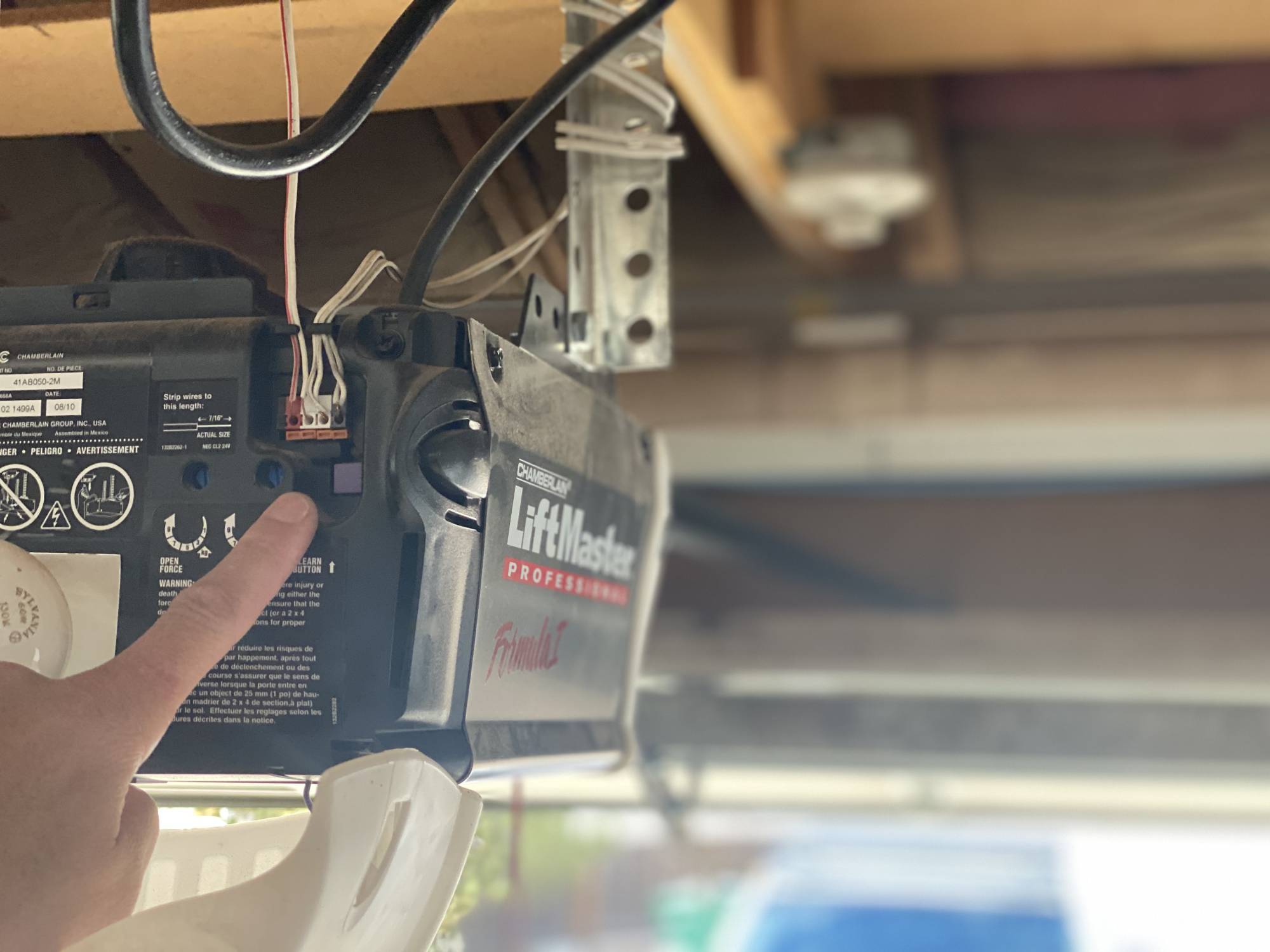
All LiftMaster openers come with a Learn button on LiftMaster garage door opener, which is the brain of the operation. If you have picked up a new accessory, like a remote or an internet gateway, the instructions will direct you to the Learn button to set things up. We receive many questions from people trying to find the Learn button on their LiftMaster or wondering where the Liftmaster learn button garage door opener. Here’s a guide to help you locate it and get started.
Table Of Content
Understanding the Learn ButtonLocating the Learn Button on LiftMaster Models
Step-by-Step: How to Locate and Use the Learn Button
Common Issues and Troubleshooting
Safety Precautions
FAQs
Need Help with Your LiftMaster Garage Door Opener?
Understanding the Learn Button
The Learn button on LiftMaster allows you to sync remotes and keypads to your garage door opener. When you press it, the opener goes into “learning” mode so it can connect to the device you are trying to program.
The Learn button can also:
- Clear all remote controls from the opener’s memory. This is helpful if you lose a LiftMaster program remote and don’t want someone else using it to enter your garage.
- Reset the opener. If your opener is acting up, the Learn button can help you wipe the system and get things running smoothly again.
Find Your LiftMaster Learn Button Now
Locating the Learn Button on LiftMaster Models
The location of the Learn button can vary depending on the LiftMaster model you have. Typically, you’ll find it on the back or side of the motor unit. That said, some units may hide the Learn button under a light cover or a small access panel.
If you are still unsure about where is the learn button on a LiftMaster, refer to your manual or call a Reno garage door repair expert for help.
Step-by-Step: How to Locate and Use the Learn Button
Ready to get hands-on? Here’s a straightforward guide to finding and using the Learn button:
Step 1: Get to the Motor Unit
Inspect the motor unit of your garage door opener. It is usually mounted on the ceiling in the center of your garage. You will probably need a sturdy ladder or step stool to reach it safely. Make sure you have enough visibility, grab a flashlight if the area is dim.
Step 2: Look at the Back or Side
Once you’re up there, check the back or side of the motor unit. The Learn button should be located in one of these spots. If it’s under a light cover, simply slide or lift it off.
Step 3: Recognize Visual Cues
As we mentioned earlier, the Learn button’s color varies by model, so don’t be surprised if it’s yellow, red, orange, or purple. It is almost always located near the antenna wire, the thin wire hanging down from the motor unit.
To make things easier, many LiftMaster models include a small LED light next to the Learn button. If the light flashes when you press the button, you’ll know your opener is in programming mode. All you have to do now is follow the instructions for pairing your remote, wall control panel, or other accessory.
Step 4: Learn How to Program a LiftMaster Remote
Once you have located the learn button on LiftMaster, follow the instructions to program your remote. Not sure how? Check our guide on how do you program a LiftMaster remote for a step-by-step walkthrough.
Unlock Your Garage Door’s Features Today
Common Issues and Troubleshooting
Here are some common problems people face when programming with the Learn button and simple tips to help you get things working again:
Problem: The Remote Isn’t Pairing
If your garage door remote isn’t syncing, make sure you are holding the remote button long enough during programming, usually a few seconds. See that you’re within range of the opener; standing too far away can cause pairing to fail. Also, don’t forget to check the battery in your remote. A weak or dead battery is often to blame for non-responsive remotes.
Problem: The Learn Button Doesn’t Respond
For this issue, try unplugging the opener for a minute and plugging it back in. Doing this resets the system and can resolve minor glitches. If the button is still unresponsive, it could be a hardware glitch, and you may need to call for professional garage door repair in Reno, NV.
Problem: The System Won’t Forget Old Remotes
To clear all old program remote controls for security reasons, you will need to erase the memory. Press and hold the Learn button for about six seconds. Keep an eye on the LED indicator light, once it turns off, all previously programmed remotes are cleared from the system.
After clearing the memory, you’ll need to reprogram any remotes or keypads you still use. If you’re unsure about the steps, check out our guide on how to program a LiftMaster remote control for an easy walkthrough.
Problem: The Keypad Isn’t Syncing
If the keypad won’t sync, double-check the code and follow the instructions step by step. Some keypads require a specific sequence or multiple button presses to complete the programming.
Safety Precautions
When working with your LiftMaster garage door opener, keep these key safety tips in mind to avoid accidents:
- Use a sturdy ladder or step stool to reach the motor unit. Don’t stand on anything unstable or unsafe.
- Unplug the motor unit before starting so it doesn’t accidentally activate while you’re working.
- Keep your hands and tools away from the chain, belt, and any other moving parts.
Take your time to avoid mistakes. Rushing can lead to problems or safety risks. Also, after programming, test all garage door remotes or accessories to make sure they’re working correctly before finishing up.
Troubleshoot Your LiftMaster Opener Here
FAQs
Need Help with Your LiftMaster Garage Door Opener?
There you have it, a complete guide to finding the Learn button on your LiftMaster garage door opener. If you still have questions, don’t hesitate to reach out to the Thompson Garage Doors team!
As an authorized dealer and installer of LiftMaster products, we’re ready to assist with anything, from programming remotes to full system upgrades. Contact us today, we are always happy to help!