

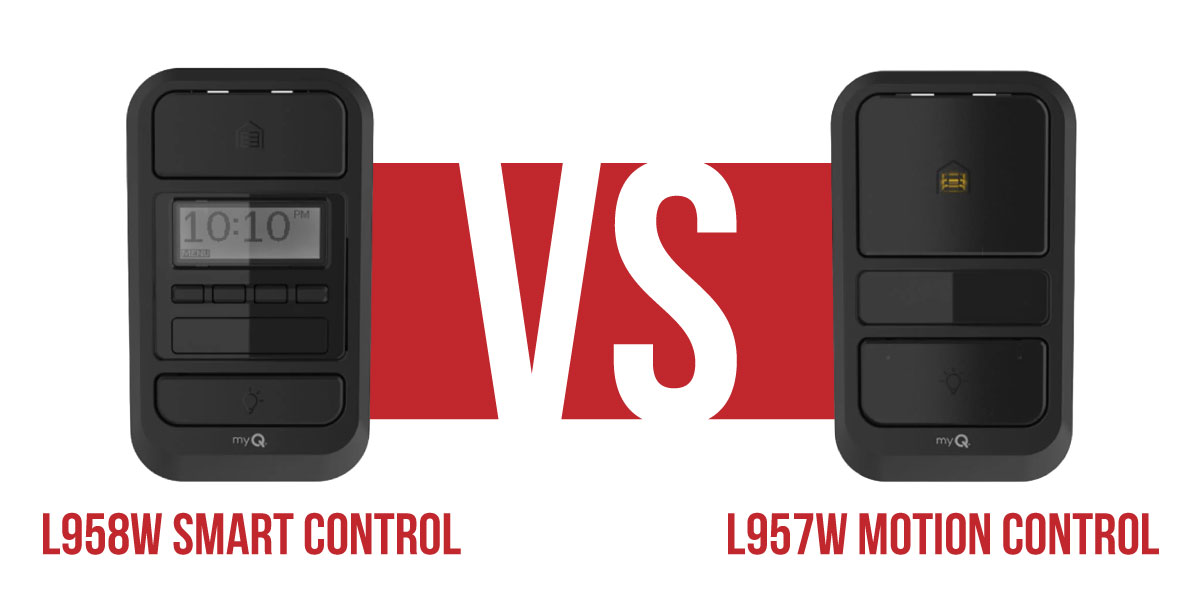
If you’re upgrading a wall control on a newer LiftMaster opener, there’s a good chance you’ve narrowed your options down to two models: the LiftMaster L958W Smart Control Panel and the LiftMaster L957W Motion Detecting Control Panel.
Both panels are designed for LiftMaster Security+ 3.0 openers with a white Learn button and include the features most homeowners use every day, like motion-activated lighting, simple push-button door operation, and built-in programming controls.
For many homeowners, either panel will be a significant upgrade from a basic wall button. The question is whether you need the extra features offered by the L958W or if the simpler L957W is all you need.
In this LiftMaster L958W vs L957W comparison, we’ll walk through the differences, explain which openers they’re compatible with, cover installation and programming, and help you decide which wall control makes the most sense for your garage.
At a Glance
Both Models Include:
- Motion-activated lighting
- Large push-bar door control
- Built-in Learn button for programming remotes and accessories
- Dedicated light control button
- Wired connection to the opener (no batteries required)
Both Models Require:
- A LiftMaster Security+ 3.0 opener with a white Learn button
The Main Difference:
- The L958W adds an LCD screen, Timer-to-Close, and Lock Mode
- The L957W provides the same core functionality in a simpler, more affordable package
At Thompson Garage Doors, we install both models throughout Reno and Northern Nevada and can help you choose the right LiftMaster Security+ 3.0 wall control based on your opener, your preferences, and how you use your garage every day.
Authorized LiftMaster Dealer | Factory-Trained Technicians | Reno & Northern Nevada
Thompson Can Help You Choose and Install the Right PanelLiftMaster L958W vs. L957W – Side-by-Side Feature Comparison
The L958W and L957W share a lot of the same core functionality. In fact, for everyday garage door operation, many homeowners would notice very little difference between them. The biggest difference is that the L958W includes a few extra features for homeowners who want more control over their garage door system.
Features You’ll Get With Either Panel
- Compatibility with LiftMaster Security+ 3.0 openers (white Learn button models only).
- Motion-activated lighting that automatically turns on the opener lights when movement is detected.
- A large push bar for quick, one-touch door operation.
- A dedicated light control button that operates the garage lights independently from the door.
- A built-in Learn button for programming remotes, keypads, and compatible accessories.
- A wired connection to the opener.
Neither panel will work with older LiftMaster openers that use yellow, purple, red, or orange Learn buttons.
What Sets the L958W Apart?
The LiftMaster L958W smart control panel is the more advanced option of the two.
The built-in LCD screen displays helpful information, such as the time, temperature, and system status messages. It also includes Timer-to-Close, which can automatically close the garage door after a selected amount of time.
Another standout feature is Lock Mode. When activated, it temporarily disables remote controls, adding an extra layer of security when you’re away from home or simply don’t want remotes being used.
For homeowners who want a little more control over their garage door system, the L958W serves as a convenient command center right on the wall.
Why Homeowners Choose the L957W
The LiftMaster L957W motion detecting control focuses on the features most homeowners use every day without adding extra settings or menus.
You still get motion-activated lighting, a large push bar, and built-in programming controls, but without the LCD display, Timer-to-Close, or Lock Mode. Some versions of the L957W also include a Maintenance Alert System that can notify you when your opener may need service.
Which LiftMaster Wall Control Should You Choose?
Choose the LiftMaster L958W smart control panel if you want:
- Timer-to-Close functionality
- An LCD status display
- Lock Mode for additional security
- More control over your garage door system
Opt for the LiftMaster L957W motion detecting control when:
- Motion-activated lighting
- Straightforward push-bar operation
- Easy programming
- A more budget-friendly upgrade
For many homeowners, the L957W provides everything they need. The L958W is worth the upgrade if you’ll actually use the additional automation and security features.
Find Your Perfect LiftMaster Upgrade
Compatibility – Which Openers Work With the L958W and L957W?
Before choosing either wall control, it’s important to make sure your garage door opener is compatible.
The LiftMaster L958W and L957W are designed exclusively for LiftMaster Security+ 3.0 openers. The easiest way to identify a compatible opener is by checking the Learn button on the motor unit. If it’s a white, round Learn button, you’re in good shape.
Compatible LiftMaster Openers
Some of the most common compatible models include:
- LiftMaster 2100L
- LiftMaster 2220L
- LiftMaster 2420L
- LiftMaster 4690L
- LiftMaster 6580L
- LiftMaster 6690L
If you have one of these openers, either wall control will work with your system.
Openers That Are Not Compatible
The L958W and L957W will not work with older LiftMaster opener generations, including:
- Models with a yellow Learn button (Security+ 2.0), such as the 98022, 98032, and 8500W.
- Models with a purple Learn button (Security+ 315 MHz systems).
- Models with a red or orange Learn button (older Security+ openers).
Why the White Learn Button Matters
While the model number can help identify compatibility, the Learn button color is usually the quickest way to know for sure. Security+ 3.0 openers use a white Learn button and communicate using newer wireless technology than previous LiftMaster generations.
Not sure what opener you have? Thompson Garage Doors can identify your current system and recommend the right LiftMaster Security+ 3.0 wall control for your garage.
Installing the LiftMaster L958W or L957W
Installing the L958W or L957W is fairly straightforward, but it does involve wiring. Be sure to turn off power to the garage door opener, so the wall control can be connected safely.
Wiring the Wall Control
The L958W and L957W connect to the opener using low-voltage door control wiring. In most residential garages, this is a standard two-wire connection running from the wall panel to the control terminals on the opener.
A few things to keep in mind:
- Use the low-voltage wiring specified for your opener.
- Do not connect the wall control to line voltage.
- Standard two-conductor 22 AWG wire works for most residential installations.
- Make sure the wires are connected to the correct opener terminals.
The wired panel will receive power directly from the opener, so there are no batteries to replace.
Mounting the Panel
The wall control should be mounted at a comfortable height near the entry door between your home and garage. That way, it’s easy to reach when you’re coming and going.
Since the motion sensor is located near the top of the panel, it should also have a clear view of the garage interior. Avoid placing it behind shelving, storage bins, or anything that could block movement detection.
Using the Built-In Learn Button on the L958W or L957W
One helpful feature on these panels is the built-in Learn button. Instead of reaching up to the opener motor, you can program remotes, keypads, and compatible accessories right from the wall control.
Programming a Remote From the Wall Panel
- Press and release the Learn button on the L958W or L957W.
- The opener LED will turn on, giving you about 30 seconds to pair the remote.
- Press and hold the button on your remote.
- Release the button when the opener LED blinks twice.
- Press the remote again to test it.
Once the door responds, the remote is ready to use.
Control Your Garage With Confidence
Setting Timer-to-Close on the L958W
Timer-to-Close is one of the biggest reasons homeowners choose the L958W. It can automatically close the garage door after a selected amount of time.
To set it up:
- Press and hold the light button on the L958W until the LCD screen shows the timer menu.
- Use the push bar to scroll through the available time options.
- Choose from options such as 1, 5, 10, 15, 20, or 30 minutes.
- Stop on the time you want, and the panel will save the setting automatically.
After that, the door will close on its own after the selected time whenever the feature is active.
Activating Lock Mode on the L958W
The L958W also includes a Lock Mode feature that temporarily disables remote controls.
Many homeowners use this when traveling, leaving for extended periods, or simply wanting an extra layer of security.
To activate Lock Mode:
- Press and hold the push bar for about two seconds.
- The LCD display will show “LOCK.”
While Lock Mode is active, remote controls will not operate the garage door.
To restore normal operation, press and hold the push bar again until Lock Mode is turned off.
L958W & L957W Frequently Asked Questions
Can I install the L958W or L957W myself?
Many homeowners choose to install these wall controls themselves since they use simple low-voltage wiring. However, professional installation helps ensure proper wiring, compatibility verification, and full system testing after installation.
Is the L957W still available?
Yes. While the L958W offers more advanced features, the L957W remains a popular option for homeowners who want motion-activated lighting and simple wall control without the LCD display or additional settings.
Can I use Timer-to-Close on the L958W and in the myQ app at the same time?
Yes. The Timer-to-Close feature built into the L958W can work alongside Timer-to-Close settings configured through the myQ app.
My L957W motion sensor isn’t turning on the lights. What should I check?
Start by confirming that your opener is a compatible Security+ 3.0 model with a white Learn button. Next, check the wiring connections between the wall control and opener. In most cases, compatibility or wiring issues are the cause of motion sensor problems.
Does the L958W require a subscription to use Timer-to-Close?
No. Timer-to-Close is built directly into the L958W wall control panel and works independently of the myQ app. You don’t need a subscription, internet connection, or smartphone to use this feature.
Will the L958W or L957W work with my older LiftMaster opener?
The L958W and L957W are designed for Security+ 3.0 openers with a white Learn button. They won’t work with older LiftMaster systems that use yellow, purple, red, or orange Learn buttons. If you’re unsure what model you have, Thompson Garage Doors can help identify it.
Upgrade Your Garage Control Panel
Upgrade Your Garage Wall Control – Thompson Installs L958W & L957W in Reno
A wall control may seem like a small part of your garage door system, but the right one can make everyday use more convenient. Whether you’re interested in the advanced features of the L958W or the simplicity of the L957W, Thompson Garage Doors can help you choose the right option for your opener.
Our factory-trained technicians install and service LiftMaster accessories throughout Reno, Sparks, Carson City, and surrounding Northern Nevada communities. We’ll verify compatibility, install the new panel, and make sure everything is programmed and working properly before we leave.
Authorized LiftMaster Dealer | Factory-Trained Technicians | Serving Reno & Northern Nevada